Embedded (Mobile)
This option brings the full myFlowpay experience into your native mobile app, optionally carrying your branding. For a web host app, use Embedded (iFrame) instead.
There are two ways to show myFlowpay in the app:
- WebView host page (preferred). The app shows a small static page from your domain in a WebView. The page embeds myFlowpay with the same SDK as Embedded (iFrame). The app gets the signed launch payload from your backend and gives it to the page. There is no URL to forward to another person. Session refresh and logout work as in the web embed.
- Launch URL. The host app backend asks Flowpay for a single-use launch URL and the app opens it in an in-app browser presented over the host app. The customer closes it to return to the host app. Use it when your app cannot show a WebView page. Until it is used or expires, the URL signs in any person who opens it.
This option requires you to do one of the following:
- Show the WebView host page and sign the launch payload on your backend
- Request a launch URL from the host app backend and open it in an in-app browser
Optional or required, depending on our agreement with you:
- Provide merchant's sales transaction data via API (or Bulk sales transactions export) – gives us data you already hold instead of relying only on what the customer connects themselves, and enables pre-scoring of your customer base
Optionally, you can also:
- Receive webhooks to learn how the customer is progressing – needed only if you want to show financing status in your own UI, present our financing offer alongside your other content, or act on the outcome
Value stream and process overview
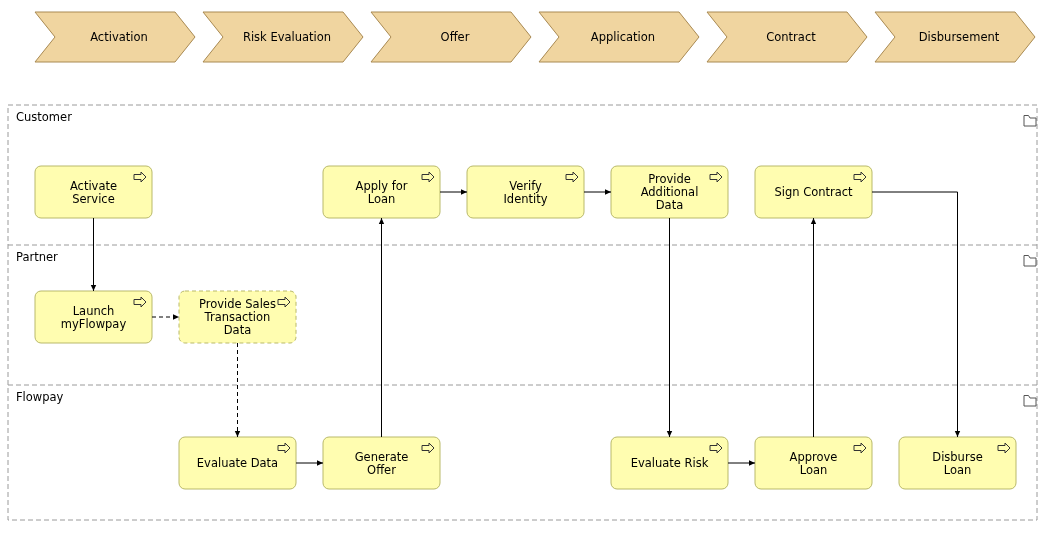
Dashed steps are optional.
Branding
Branding is optional. Where you want it, it works exactly as it does for the iFrame option. Flowpay can provide a custom CSS theme built from your brand colors and fonts. The WebView host page uses the same embed subdomain as the iFrame option (e.g. flowpay.yourdomain.com), where it is a technical requirement. The host page itself sits on another subdomain of the same root domain (e.g. flowpay-app.yourdomain.com). For the launch URL, the subdomain is optional and only affects what the address bar shows. A launch URL subdomain cannot be the one the iFrame option or the WebView host page uses.
Customer base pre-scoring
This option also allows to run pre-scoring for the whole customer base and approach the customers with pre-generated offers. All that is required is that you provide us with your customer's pseudonymized sales transactions data (typically orders or payments). Based on the data we generate financing offers and you distribute them to your customers in your preferred way.
Tech specs
See tech specs below to learn about the two ways to show myFlowpay in the app and the data interfaces you can use alongside them.
- Mobile apps
- WebView host page (preferred)
- Launch URL
- Promo codes – customers enter them in myFlowpay, nothing to implement
- (by agreement) Sales transactions API
- (by agreement) Bulk sales transactions